Showing posts with label websites. Show all posts

Sunday, February 6, 2011

How to update Facebook from Twitter

This post looks at how you can easily update Facebook and Twitter at the same time, while only visiting Twitter, or your favourite Twitter client.
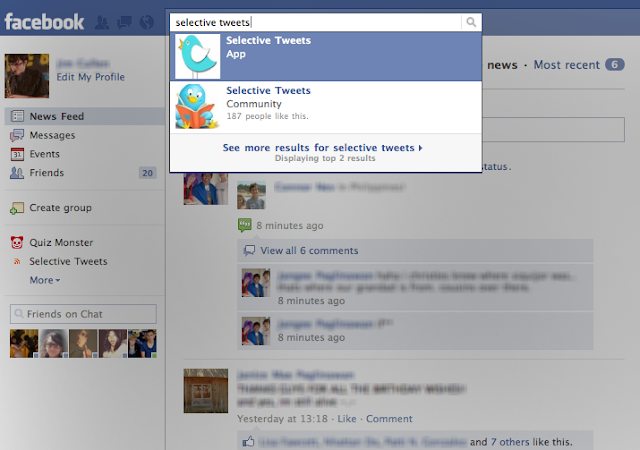
  1. Go to Facebook, and search for "Selective Tweets"

    Select the App with that name.
  2. Type in your Twitter handle in the box next to the "@", and click "save"
  3. Then just append "#fb" to the end of any tweet, and it will automatically be sent to Facebook as your status. Read past the break for a few little extras

Wednesday, February 2, 2011

New Logo

I've recently created a new logo for Music Meets Tech.

You can clearly see I'm no graphic designer, but I think it's quite nice. It gives the general idea of what this blog is about.

I designed it on my Mac in Adobe Photoshop, using a variety of images which belong to me, or were found on the internet.

Unfortunately, the logo isn't quite what I had in mind, because Blogger wouldn't let me have more than 200 pixels in height. It's a bit more squished than it would be otherwise, but doesn't lose anything important.

Let me know what you think of the new logo—or the design of the site in general—in the comment section below. You can post with nothing but your name and email address, or even anonymously (although it's always nice to see who the post comes from).

Friday, June 18, 2010

A review of three blogging websites, or, I've moved: again

So, I've moved my blog again. I decided to move my blog from Wordpress, at http://zagorath.wordpress.com to Google's Blogger, at http://zagorath.blogspot.com. The reasons for this are simple: Wordpress is not. I found Wordpress to be far too complicated for my uses. It was way too complicated for me.

When I was using Tumblr, I loved how easy it was to customise and edit the design. It was, however, lacking some very noticeable things. There was absolutely no in-built comment system, and no clear method for RSS. The problem with Tumblr is that it's not really a conventional blog system. It's not open enough. Tumblr is made to be used by people in Tumblr — it's a closed system, more of a social networking site than a blogging site. And because of that, I couldn't really use it for my blog.

So then I switched to Wordpress. Wordpress is an incredibly powerful blogging tool, and it is also amazingly customisable. But that's the problem. It's far too powerful, and too confusing for me. With Wordpress, you pretty much have the option of using an in-built theme, or going all-out and creating your own. It's very difficult to make many small changes. Most themes don't even allow you to have a custom background. While I'm sure Wordpress would be far superior for a serious blogger, or a web developer or something, for me, it's just far too complicated.

So that brings me to my current situation. I'm currently using Blogger. I already have a Google account, so it was really easy to set up. I've now got the advantage of being able to more easily customise my blog. For me, one disadvantage is that there are no "categories", only labels, which do the same thing as tags. Another problem is that it seems much more complicated to get Blogger to automatically Tweet with a new blog post. It has the added advantage, however, of allowing readers to comment using a variety of logins, including their Wordpress accounts, should they chose to use them.

As always, I encourage any feedback on this that you may have. What have been your experiences with any of these three blogging tools, or any others you may have come across?

Thursday, June 3, 2010

My most used programs

Software tracking

Well, I was hoping that it would add this as a permanent and dynamic widget thing on the side. Oh well.

I've been using Wakoopa for just a couple of days now, and for the most part this seems like a fairly valid result. The only anomalies are:

  • Battlefield 2, which I have not played very much in the past (in fact, I haven't done much gaming at all in the past), but have started to play a lot more recently — it coincides very nicely with my IGCSE exams. Oh joy...

  • WordPress, which I also have only recently started using

  • Wakoopa — this one pretty much speaks for itself. Obviously I've been on their website a lot lately checking things out.


Anyway, if you're interested, Wakoopa is a neat little program that monitors which programs and websites you use most often. You can choose to make this public, as I have, or you can keep it private, if you're that way inclined. It's available for Mac, Windows, and Linux.